Self-Managed VPS: What It Means and Why It Matters
Published: · Updated: · 6 min read · By Oluniyi D. Ajao
Introduction
When you order a VPS from AFRICLOUD, you receive a self-managed virtual private server. This is sometimes called an "unmanaged" VPS, though we prefer "self-managed" because it better reflects the reality: you are in control. This article explains exactly what that means, what responsibilities fall to you, what AFRICLOUD takes care of, and whether self-managed VPS hosting is the right choice for your needs.
Self-managed VPS is the standard model across the hosting industry for Cloud Servers. It gives you full root access and complete freedom to configure your server however you like. That freedom comes with responsibility - and this guide will help you understand both sides clearly.
What "Self-Managed" Actually Means
A self-managed VPS means you get a Cloud Server with full root (Linux) or administrator (Windows) access. You choose your operating system, install your software, configure your firewall, apply security updates, and deploy your applications. You are the system administrator.
AFRICLOUD provides and maintains everything beneath the virtualisation layer: the physical hardware, network connectivity, power, cooling, physical security, and the KVM hypervisor that runs your virtual machine. If a hard drive fails or a network switch goes down, that is our problem to solve - and we do, backed by a 99.9% infrastructure uptime target.
Here is a clear breakdown of responsibilities:
| AFRICLOUD Handles | You Handle |
|---|---|
| Physical server hardware | Operating system installation and configuration |
| Network connectivity (1-8 Gbps) | Software installation and configuration |
| KVM virtualisation layer | Security updates and patches |
| Power, cooling, physical security | Firewall rules and network security |
| DDoS protection | Application deployment and maintenance |
| 99.9% uptime target (infrastructure) | Backups of your data |
| Hardware replacement if failed | User account management |
| VPS provisioning (deploy in minutes) | Monitoring your services |
This division is straightforward: we keep the infrastructure running; you manage everything inside your Cloud Server.
Who Self-Managed VPS Is For
Self-managed VPS hosting is well-suited for:
- Developers who want to deploy applications on their own terms, with the exact stack they need.
- System administrators who are comfortable with Linux command-line operations and server hardening.
- Businesses with technical staff - whether in-house or contracted - who can manage server infrastructure.
- Learners who are willing to invest time in understanding server administration. A VPS is one of the best ways to learn Linux and networking in a real-world environment.
- Anyone who values full control over their hosting environment, from kernel parameters to cron jobs.
Self-managed VPS is not ideal for someone who has never used a terminal, does not want to learn, and needs their hosting to "just work" without any technical involvement. If that describes you, a managed hosting provider or a platform-as-a-service (PaaS) may be a better fit. There is no shame in choosing the right tool for your situation.
What You Get When You Order
When you place an order at africloud.com/order, your VPS is provisioned automatically, with no approval queue. Here is what you receive:
- A fresh VPS with your chosen operating system. We offer Ubuntu, Debian, AlmaLinux, Rocky Linux, and other popular distributions.
- Full root access via SSH. You connect with the credentials provided at provisioning.
- A VPS control panel at africloud.com/my for basic operations: reboot, shut down, reinstall OS, access the console (VNC), and view resource usage.
- A dedicated IPv4 address assigned to your VPS.
- The resources you ordered: CPU cores, RAM, NVMe SSD storage, and bandwidth as specified in your chosen plan (VM1 through VM8).
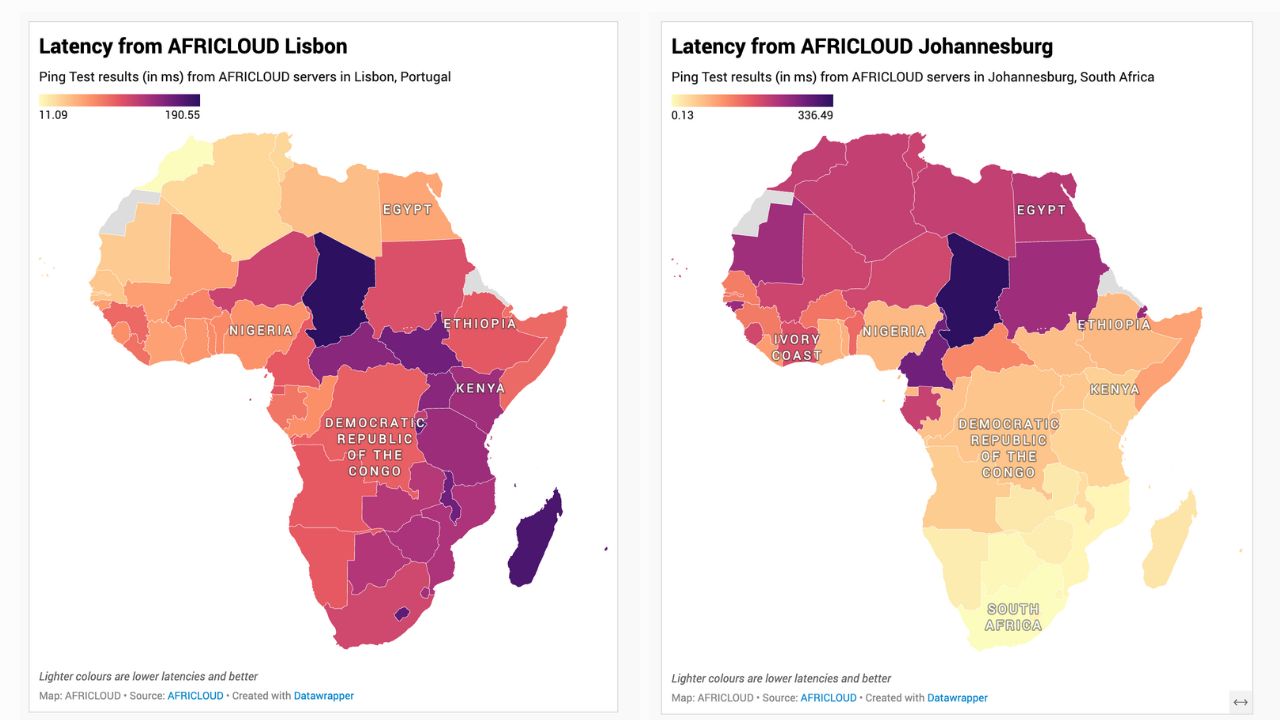
You can test network performance to our data centres before ordering using our Looking Glass tool, which provides ping, traceroute, and MTR tests from Lisbon, Johannesburg and Lagos.
Your First Steps After Ordering
Once your VPS is provisioned, here is a practical sequence to get started securely:
1. Log in via SSH
Open your terminal and connect:
ssh root@your-server-ipUse the password provided in your provisioning email. You will change this shortly.
2. Update your system
On Debian/Ubuntu:
apt update && apt upgrade -yOn AlmaLinux/Rocky Linux:
dnf update -yKeeping packages up to date is your first and most important security measure.
3. Set up a firewall
On Ubuntu, use UFW:
ufw allow 22/tcp
ufw enable
On AlmaLinux/Rocky Linux, use firewalld:
systemctl enable --now firewalld
firewall-cmd --permanent --add-service=ssh
firewall-cmd --reload
Only open ports you actually need. A firewall is essential on any public-facing server.
4. Create a non-root user
adduser yourusername
usermod -aG sudo yourusername
Working as root for day-to-day tasks is risky. Create a regular user with sudo privileges instead.
5. Set up SSH key authentication
From your local machine:
ssh-copy-id yourusername@your-server-ipThen disable password authentication in /etc/ssh/sshd_config by setting PasswordAuthentication no and restarting the SSH service. This significantly reduces the risk of brute-force attacks.
6. Get help if needed
If you get stuck, our support portal is available for questions about your VPS provisioning or control panel. For general Linux administration guidance, resources like the DigitalOcean community tutorials and the Arch Wiki are excellent references.
Self-Managed vs Managed: When to Choose What
The distinction is straightforward:
- Self-managed VPS: You handle everything inside the VM. Lower cost, full control, full responsibility. This is the standard for VPS hosting and is what AFRICLOUD offers.
- Managed VPS or managed hosting: The provider handles OS updates, security patches, software configuration, and sometimes application-level support. Higher cost, less control, less responsibility.
Self-managed is the right choice when you have the skills (or the willingness to develop them) and want maximum flexibility. It costs less because you are providing the labour that a managed provider would charge for.
Managed hosting is the right choice when you need your hosting environment maintained by someone else - perhaps because your team's skills are elsewhere, or because you would rather pay for expertise than invest time learning. AFRICLOUD does not currently offer managed VPS. If you need managed hosting, we would rather be honest about that than sell you something that does not match your expectations.
A middle ground exists: hire a freelance system administrator or use a server management panel like Virtualmin, CloudPanel, or similar tools. These can simplify many routine tasks while keeping costs lower than fully managed hosting.
Support Scope
Clarity on support boundaries prevents frustration on both sides. Here is exactly what our support team covers and does not cover:
AFRICLOUD support covers:
- Hardware failures affecting your VPS
- Network connectivity issues on our infrastructure
- VPS provisioning problems (server not deploying, wrong OS, etc.)
- Billing and account questions
- VPS control panel access and functionality
- DDoS mitigation on our network
AFRICLOUD support does not cover:
- Installing or configuring your software
- Debugging your application code
- OS-level troubleshooting (e.g., why Apache will not start)
- Recovering data you did not back up
- Performance tuning your applications
- DNS configuration for your domains
All support is provided via our ticket system. We aim to respond promptly, and infrastructure issues receive priority attention. If your VPS hardware is faulty, we will fix or replace it. If your WordPress installation is broken, that is outside our scope - but we will confirm whether the underlying VPS is functioning correctly.
Getting Started
A self-managed VPS gives you a foundation to build whatever you need. Whether you are deploying a web application, running a database, hosting game servers, or experimenting with new technologies, the server is yours to command.
If you are migrating from another provider, our VPS migration guide walks through the process step by step. If you are an African startup exploring cloud infrastructure, see our overview of VPS for African startups. You can also test our network before committing at lg.africloud.com.
Ready for full control? Explore AFRICLOUD VPS plans starting from $20/month. You can also pay with Bitcoin and cryptocurrency. Use promo code 50NEW for 50% off, applied to every renewal.
Questions? Open a ticket at africloud.com/support and we will help you get started.